Compress the labor
Bring SQL paths, source and target identity, backups, safety checks, and output planning into one guided view before the technician commits.


Software developed by West Coast Security, Inc.
A professional Windows utility suite for qualified technicians performing authorized work in compatible Hirsch Velocity environments.
Built for field work
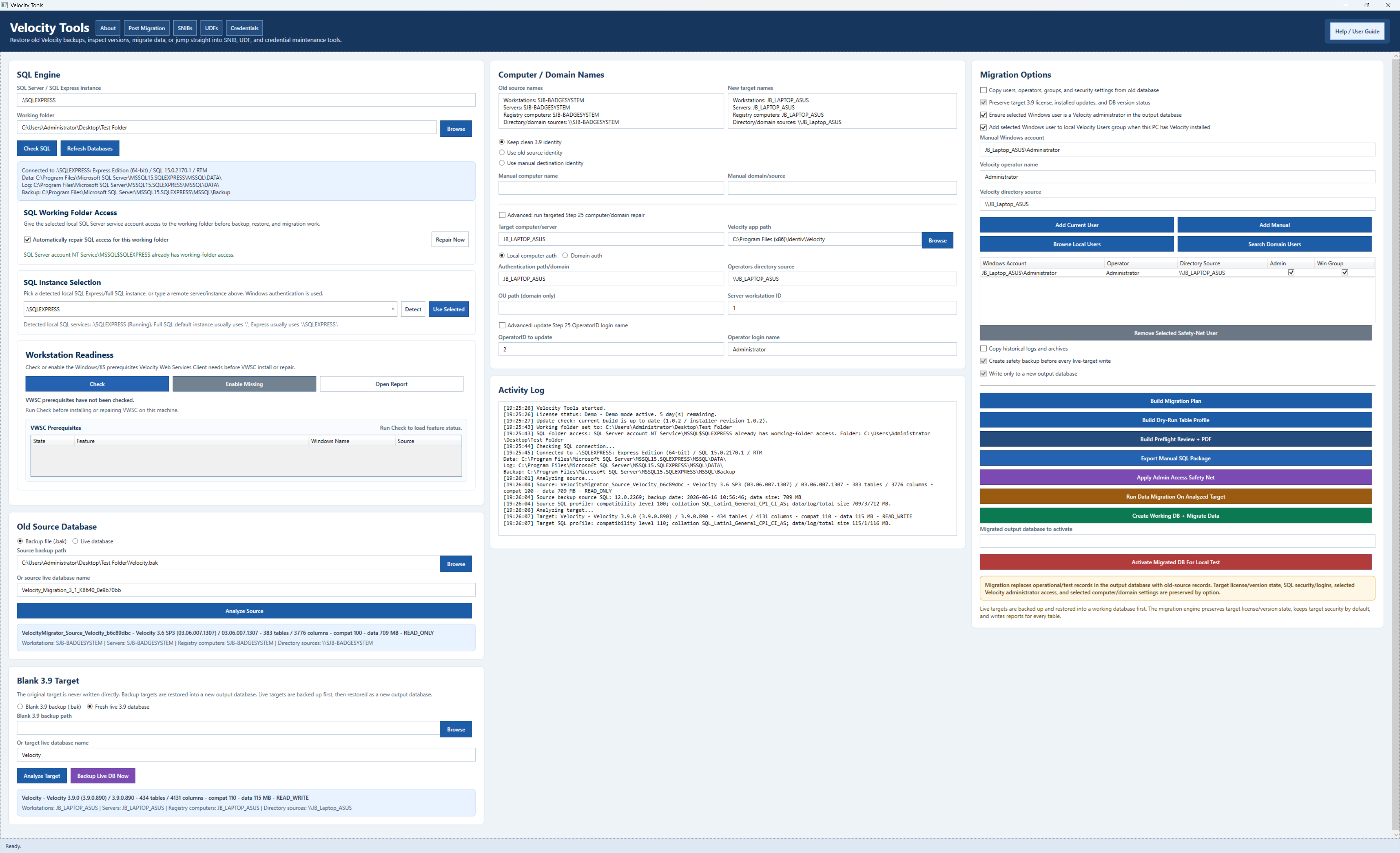
Velocity Tools brings SQL discovery, migration planning, SNIB workflows, workstation readiness, documentation, and system utilities into one WCS-developed technician suite.
Bring SQL paths, source and target identity, backups, safety checks, and output planning into one guided view before the technician commits.
Identify missed prerequisites, address conflicts, workstation assumptions, and migration concerns before they become expensive customer-site problems.
Use repeatable checks, clearer records, controlled execution, and documented results instead of assembling critical changes from disconnected manual steps.
Technician capabilities
Velocity Tools does not replace Hirsch Velocity. It supports qualified technicians with WCS-built workflows for authorized administration, migration, preparation, and field service.
Source, destination, instance identity, backup readiness, conflict checks, migration records, and post-write validation.
Addressing preparation, source selection, validation, batch safeguards, and documented field changes.
Computer, domain, operator, account, prerequisite, and environment details gathered before they delay the service call.
UDF, credential, Match Code, licensing, documentation, and support information available through one technician console.
Product walkthrough
The technician walkthrough demonstrates SQL discovery, migration planning, identity repair, workstation readiness, and compatible Hirsch Velocity support tasks.
Current release
The installer is protected by the WCS controlled-download request flow. Licensed customers can use the supported update path for current releases.
Windows or your browser may ask you to confirm a newly downloaded installer. The production MSI is code-signed by James Brown. Download activity is handled under the WCS download privacy notice.
Review the software use and safety notice before SQL migration or production database maintenance.
ACB97DFF08478F5F7BC0ACC884D4F1DA8FF7FCCF3FBE30528C836E722E3DBD68Velocity Tools is independently developed by West Coast Security, Inc. for qualified technicians working on systems they are authorized to support. Hirsch and Velocity are third-party product names and trademarks used only to identify compatible environments and workflows. No manufacturer ownership, sponsorship, or endorsement of Velocity Tools is implied.