

Get help without searching through the phone
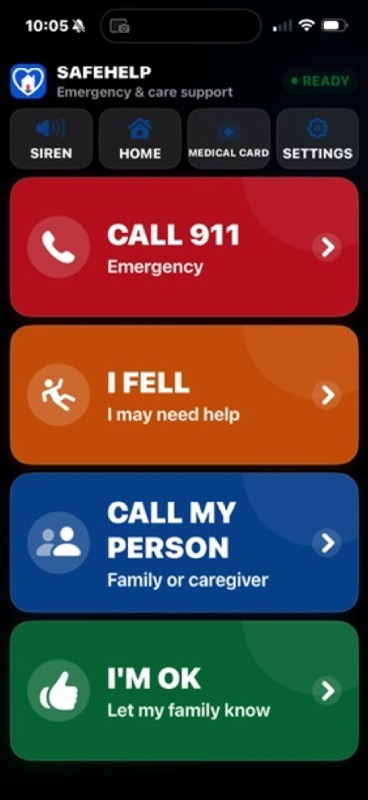
A large CALL 911 choice provides a deliberate handoff to Apple's calling workflow.
Safety made simpler for the people you love.
SafeHelp gives older adults, people living with dementia, Alzheimer's or memory challenges, disabled users, and children with caregiver support large, unmistakable ways to call for help, reach family, check in, or find the way home.
Built for families and caregivers who want greater peace of mind without taking away independence.
Free to download. Essential safety features remain available without a subscription. Optional SafeHelp Plus starts with a 14-day free trial for eligible new subscribers, then renews at $4.99 per month or $39.99 per year through Apple.
Free essential safety tools
No SafeHelp account required
Private information stays on the device
iPhone, iPad & Apple Watch
When something goes wrong, the user should not have to figure out how to use their phone.
Fewer steps when every step matters
SafeHelp brings the actions people may need most into one calm, easy-to-recognize place. Calls, messages, directions, and sharing remain visible and user driven.
A large CALL 911 choice provides a deliberate handoff to Apple's calling workflow.
CALL MY PERSON brings the configured family member or caregiver forward without searching through contacts.
I'M OK prepares a reassuring message for the person to review before sending.
TAKE ME HOME can open directions and optionally prepare a location message for the user to review.
I FELL prepares a help message for review. It does not automatically detect a fall or send a message.
The on-device Medical Card makes medications, allergies, doctors, care professionals, hospital information, and notes easier to reach.
Respectful support for different needs
Large touch targets, plain language, strong contrast, icons with text, VoiceOver labels, Dynamic Type, spoken confirmations, haptic feedback, and reduced-motion support help make each choice easier to recognize.
For people living with dementia, Alzheimer's, memory loss, or other cognitive challenges who benefit from fewer, clearer choices.
For older adults who want important help and care actions to remain easy to find and understand.
For disabled users and anyone who benefits from large controls, strong contrast, spoken feedback, and minimal navigation.
For families who want a child to have clear, caregiver-configured ways to call, check in, or ask for help.
For families, nurses, hospice teams, home-care staff, and caregivers supporting a person's daily safety and independence.
SafeHelp is an assistance tool. It does not replace caregiver supervision, professional care, medical monitoring, or emergency services.
Product preview
See how SafeHelp turns urgent and everyday care needs into large, direct actions that are easier to recognize and use.
Four large, color-coded choices keep the most important actions visible without searching through the phone.
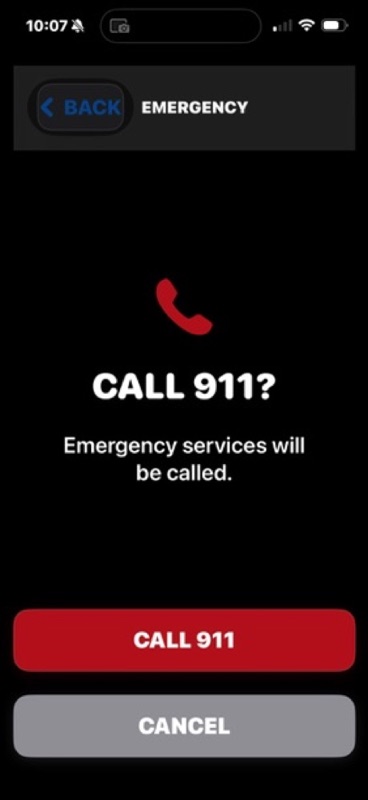
A clear confirmation helps prevent accidental calls before handing off to Apple's calling workflow.
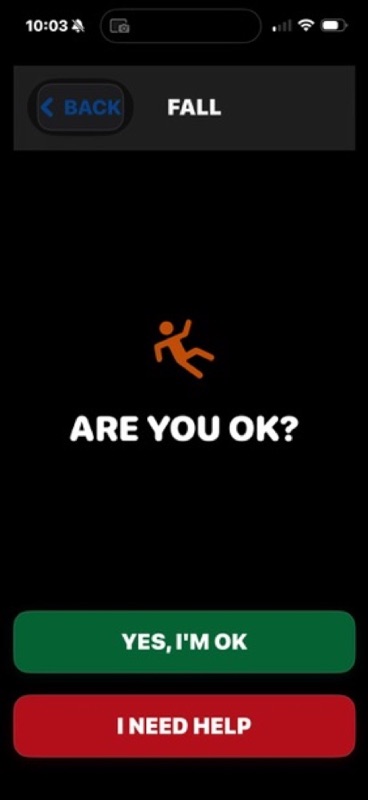
The person can say they are OK or ask for help without navigating a complicated menu.
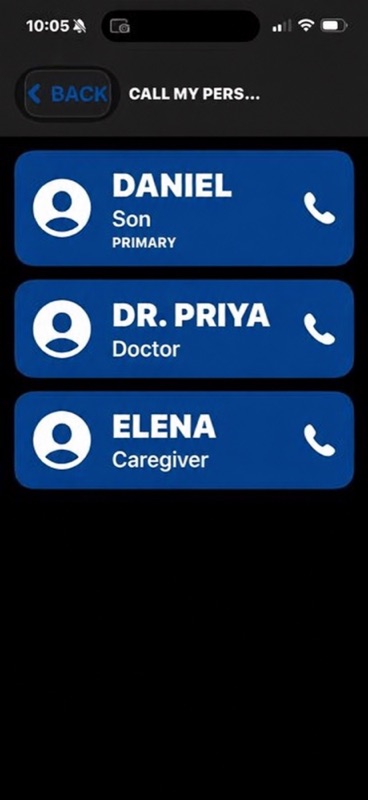
Caregiver-configured contacts bring family and care professionals forward when the person needs them.
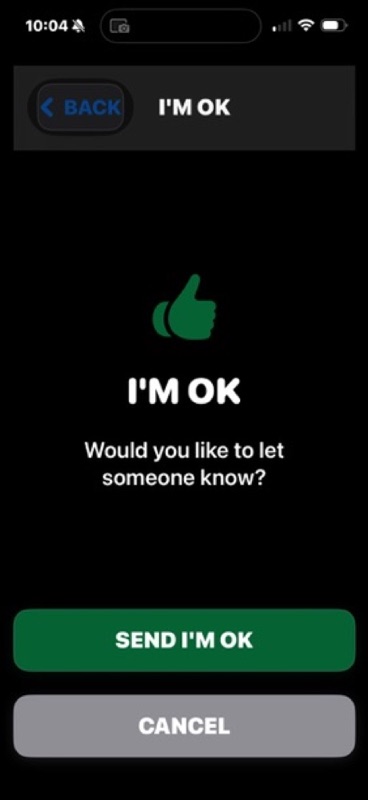
I'm OK prepares a simple check-in message for the person to review before sending.
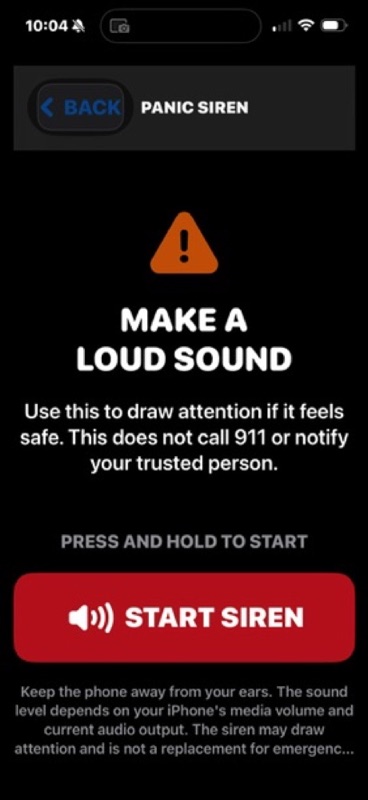
A press-and-hold siren can make a loud sound when it is safe to do so; it does not call 911 or notify a trusted person.
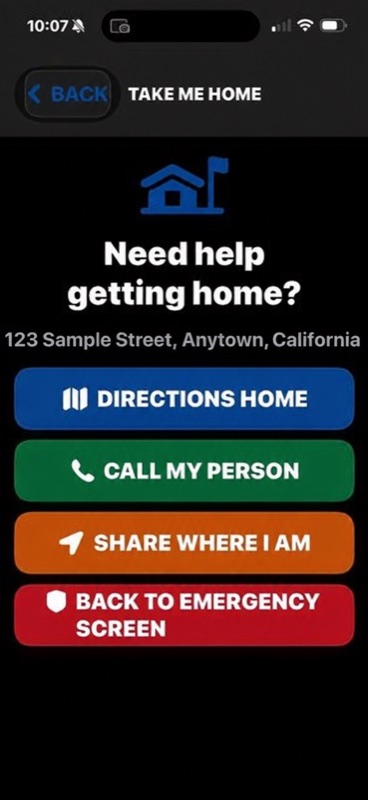
Open directions, call a trusted person, or prepare a location message from one focused screen.
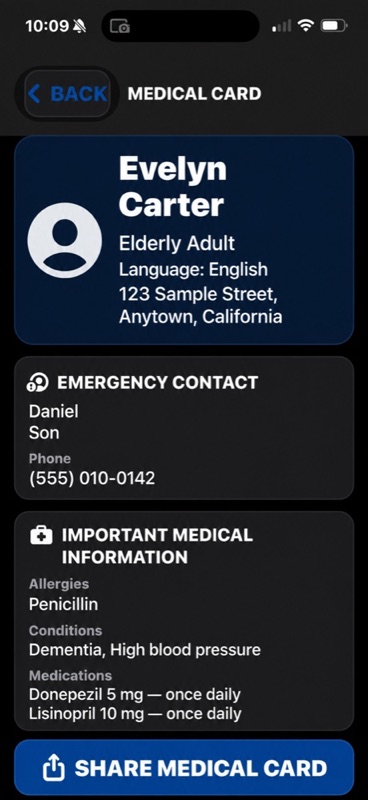
Important contact, allergy, condition, and medication information stays organized on the device and can be shared by the user.
Privacy-safe product demonstration: all names, relationships, street addresses, phone numbers, medical conditions, allergies, and medication details shown in these previews are fictitious and are not associated with real people.
Free essentials. Optional everyday support.
The essential actions remain usable without a subscription. SafeHelp Plus adds optional tools for routines and home-area awareness.
CALL 911, CALL MY PERSON, I FELL, I'M OK, panic siren, Medical Card viewing and sharing, Take Me Home, and core Apple Watch actions.
$4.99/month or $39.99/year
Home Safety Zone, prepared away and return-home texts for selected trusted people, scheduled check-ins, medication reminders, and ongoing iPhone and Apple Watch improvements.
Auto-renewable through Apple StoreKit. Manage or cancel in Apple Account settings.Clear, visible, and user controlled
SafeHelp uses familiar Apple services and keeps the person in control of calls, messages, directions, sharing, permissions, and notifications.
CALL 911 uses a deliberate Apple-supported call handoff. Help, check-in, location, and Home Safety Zone messages are prepared for review in Apple's Messages composer; SafeHelp does not call or send messages silently.
I FELL prepares a help message but is not an automatic fall detector. Location is used only for requested help, directions, or Home Safety Zone and remains subject to device permissions.
The paired Watch offers core actions from the wrist. Some detailed alert, location, or sharing steps may require review or completion on the iPhone, and behavior depends on connectivity, pairing, permissions, carrier, and Watch model.
SafeHelp Plus can schedule local check-ins and medication reminders. The press-and-hold siren uses the iPhone's current media volume and audio route; move the device away from ears before activating it.
No advertising
No tracking
No developer-operated analytics
No SafeHelp account required
No developer backend
Sensitive information stored locally
Apple processes SafeHelp Plus subscriptions
Location stays on device and is used only for requested help, directions, or Home Safety Zone
Apple services remain subject to Apple's permissions and policies
Product support
Download SafeHelp from the App Store for iPhone, iPad, and Apple Watch. Questions, feedback, and thoughtful feature requests are welcome at TechServices@wcsecurity.com. Tell us which Apple device you use, the operating-system version, and what would make SafeHelp more useful for your family or care team.